
Download eKalappai Portable – Tamil keyboard, keyboard app, mobile typing, Tamil input, language tool, non-English typing, scim-table, open-source, utility tool
Overview
eKalappai Portable is a specialized mobile application designed to support efficient typing in Tamil and other non-English languages. Its primary purpose is to provide users with a reliable, customizable, and accessible input method tailored to the linguistic needs of Tamil speakers. The app addresses the challenges of typing in Tamil on mobile devices by offering multiple keyboard layouts and compatibility with widely adopted input standards. It serves as a practical tool for individuals who require consistent and accurate Tamil input across various applications, including messaging, note-taking, and content creation.
Target users include Tamil-speaking individuals across different age groups and technical proficiencies, from students and professionals to educators and content creators. The app is especially valuable in regions where Tamil is a primary language and digital communication in the script is essential. As an open-source project, eKalappai Portable benefits from a community-driven development model, allowing for transparent updates, collaborative improvements, and user-driven customization. This approach fosters trust and long-term sustainability, making it a dependable choice in the productivity app ecosystem.
The developer did not provide additional technical details. However, the app's focus on linguistic accessibility and its adherence to the scim-table format suggest a strong commitment to interoperability and standardization. Real-world use cases include daily communication via SMS, social media, email, and document editing. Its lightweight design and free availability further enhance its accessibility, particularly in regions with limited access to premium language tools.
Key Features & Functionality
- Multiple Tamil Keyboard Layouts: eKalappai supports five distinct Tamil keyboard configurations: Tamil99, Phonetic, Typewriter, Bamini, and Inscript. Each layout is optimized for different typing styles and user familiarity. For instance, the Phonetic layout is ideal for beginners, while Inscript and Bamini cater to users accustomed to traditional keyboard mappings.
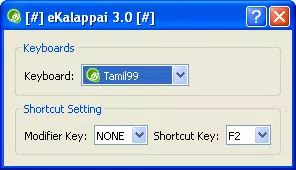
- Customizable Shortcuts: Users can assign personalized shortcuts to switch between keyboard layouts instantly. This feature streamlines the typing workflow, enabling users to adapt to different contexts without manual navigation, such as switching from a phonetic layout to a more structured one during formal writing.
- scim-table Format Support: The app uses the scim-table format, a widely recognized standard for input methods. This ensures compatibility with various applications and systems that support SCIM (Smart Common Input Method), enhancing seamless integration across platforms and environments.
- Open-Source Development Model: Being open-source allows developers and users to inspect, modify, and contribute to the codebase. This promotes transparency, rapid bug fixes, and feature enhancements based on community feedback, ensuring continuous evolution of the tool.
- User-Friendly Interface: The interface is designed for intuitive navigation, allowing users to access keyboard settings and customization options with minimal effort. The clean layout supports quick configuration, making the app accessible even to non-technical users.
These features collectively enhance the typing experience by offering flexibility, efficiency, and personalization. For example, a student preparing a Tamil-language assignment may use the Phonetic layout for speed and switch to Inscript for formal formatting, all with a single tap.
Interface, UX & Performance
The user interface of eKalappai Portable is designed with simplicity and functionality in mind. The layout is minimalistic, focusing on essential controls such as keyboard selection, shortcut assignment, and layout switching. Navigation is straightforward, with intuitive icons and clear labeling, reducing the learning curve for new users. The visual style remains consistent with standard Android input methods, ensuring familiarity across different devices.
Although the developer did not list formal performance metrics, the app’s file size of 2.4 MB suggests a lightweight footprint, which typically correlates with efficient resource usage. This implies stable performance on a wide range of Android devices, including those with limited processing power or memory. The app is expected to respond quickly to user inputs, with minimal lag during typing and layout transitions.
Responsiveness is likely optimized for everyday use, supporting smooth text entry and seamless switching between keyboard modes. Stability is reinforced by the open-source nature of the project, which allows for community-driven testing and issue resolution. While specific compatibility details were not disclosed, the use of the scim-table standard indicates broad support across Android applications.
Platform Compatibility & Technical Requirements
eKalappai Portable is available exclusively on the Android platform. The current version is 1.1.1, with a file size of 2.4 MB. The developer did not specify minimum OS requirements or device compatibility details. However, the app’s lightweight design suggests it may function on older Android versions, though users are advised to check their device’s compatibility before installation.
Given its open-source nature and focus on standard input methods, the app is likely compatible with most Android devices that support third-party keyboard installation. The absence of specific technical requirements means users should proceed with caution on devices with outdated systems or restricted permissions. The app’s free price point enhances accessibility, making it a viable option for users across different economic and technical backgrounds.
Pros and Cons
Pros
- Free to download and use, making it accessible to a wide audience.
- Supports multiple Tamil keyboard layouts for diverse user preferences.
- Uses the widely recognized scim-table format for better compatibility.
- Open-source model encourages transparency, community contributions, and customization.
- Lightweight design with a small file size, ideal for low-storage devices.
Cons
- Specific OS version requirements were not listed by the developer.
- No official updates or changelog were provided in the available data.
- Limited information on advanced customization options beyond keyboard switching.
- May not support all non-Tamil languages beyond the included keyboard layouts.
- Compatibility with newer Android versions cannot be confirmed without further details.
FAQ
Is eKalappai Portable safe to install?
Yes, the app is free and open-source, which allows for public code review. This transparency enhances security and reduces the risk of hidden vulnerabilities. However, users should always download from trusted sources.
Can I use eKalappai Portable on iOS devices?
Currently, the app is only available for Android. The developer did not indicate any plans for iOS support.
Does eKalappai support other Indian languages besides Tamil?
The app focuses on Tamil input. While it may support related scripts through its keyboard layouts, no official support for other Indian languages was specified.
How do I switch between keyboard layouts?
Users can assign customizable shortcuts to toggle between the five available layouts: Tamil99, Phonetic, Typewriter, Bamini, and Inscript.
Is eKalappai Portable regularly updated?
The developer did not provide information on update frequency. However, the open-source nature of the project suggests that updates may occur based on community contributions.
Final Thoughts
eKalappai Portable stands out as a reliable, lightweight, and community-driven solution for Tamil language input on Android. Its support for multiple keyboard layouts, scim-table compatibility, and open-source foundation make it a valuable tool for users seeking flexibility and control over their typing experience. The app is particularly beneficial for Tamil speakers who rely on accurate and efficient input in daily digital communication.
While specific technical details are limited, the app’s design, functionality, and free availability position it as a strong choice for individuals prioritizing accessibility and linguistic inclusivity. For users who need a dependable Tamil keyboard app without cost or bloat, eKalappai Portable delivers consistent value.
Download eKalappai Portable now


